Getting Source IPs behind Traefik in Kubernetes at home
Originally published on Medium, January 4, 2023
I am running all my applications on a Kubernetes cluster in my living room. Like every good DevOps person I want to see the source IPs in my application logs, for all IPv4 and IPv6 clients. As Traefik is fabulously taking care of getting and renewing Letsencrypt certificates, even with wildcard domains, I am terminating TLS on Traefik.
Setup description
My living room hosting setup looks like this:
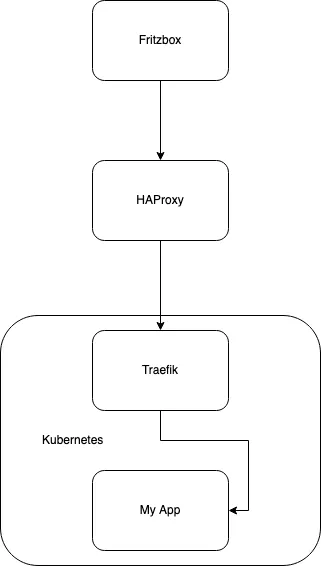
- Fritzbox is my DSL/Router, it forwards all incoming TCP for IPv4 and IPv6 on 80 and 443 to the host where HAProxy is running
- I am running HAProxy in between the Router and the Kubernetes cluster because I want to support IPv6 and as this address changes frequently, this host and its HAProxy helps to adopt to every changing IPv6. I have written another article how this works, you can find it here. The HAProxy forwards all IPv4 and IPv6 traffic on layer 4 to the IPv4 address of Traefik
- Traefik is my Kubernetes ingress controller, it terminates TLS, refreshes all my Letsencrypt certificates and forwards the http requests to my applications (e.g. "My App")
- My App gets the requests with all X-Forward-* headers properly set
HAProxy
The host running HAProxy runs Ubuntu 22.04, so the configuration for my layer 3 forwarding looks like this:
global
  log /dev/log  local0
  log /dev/log  local1 notice
  chroot /var/lib/haproxy
  stats socket /run/haproxy/admin.sock mode 660 level admin expose-fd listeners
  stats timeout 30s
  user haproxy
  group haproxy
  daemon

defaults
  timeout client          30s
  timeout server          30s
  timeout connect         30s

frontend frontend-http
  bind    :::80 v6only
  bind    :80
  default_backend backend-http

backend backend-http
  mode   tcp
  server upstream 192.168.178.50:80 send-proxy check

frontend frontend-https
  bind    :::443 v6only
  bind    :443
  default_backend backend-https

backend backend-https
  mode   tcp
  server upstream 192.168.178.50:443 send-proxy check

frontend stats
  bind :1936
  default_backend stats

backend stats
  mode http
  stats enable
  stats hide-version
  stats realm Haproxy Statistics
  stats uri /
  stats auth admin:foobar
This configuration enables a statistics page on port 1936, while also forwarding all IPv4 and IPv6 traffic on 80 and 443 to my Traefik host.
It is worth to mention that we need to enable send-proxy on the upstream servers, as this transports the source IP to the Traefik host.
Traefik
To install Traefik on Kubernetes this page explains this very well. Having said that, one needs to make a couple of additional configurations to enable source IPs:
---
  additionalArguments:
    - --certificatesresolvers.digitalocean.acme.dnschallenge.provider=digitalocean
    - --certificatesresolvers.digitalocean.acme.email=my@email.com
    - --certificatesresolvers.digitalocean.acme.storage=/certs/acme.json

  ports:
    web:
      redirectTo: websecure
      proxyProtocol:
        trustedIPs: ["192.168.178.52"]
    websecure:
      proxyProtocol:
        trustedIPs: ["192.168.178.52"]

  env:
    - name: DO_AUTH_TOKEN
      valueFrom:
        secretKeyRef:
          key: apiKey
          name: digitalocean-api-credentials

  ingressRoute:
    dashboard:
      enabled: false

  persistence:
    enabled: true
    path: /certs
    size: 128Mi

  service:
    spec:
      externalTrafficPolicy: Local
    externalIPs:
      - 192.168.178.50

  logs:
    general:
      level: INFO

  hostNetwork: true

  affinity:
    nodeAffinity:
      requiredDuringSchedulingIgnoredDuringExecution:
        nodeSelectorTerms:
        - matchExpressions:
          - key: node-role.kubernetes.io/master
            operator: Exists

  tolerations:
    - key: node-role.kubernetes.io/master
      effect: NoSchedule
The first section additionalArguments configures Traefik for DNS challenge with Digitalocean.
The second section ports makes sure that all http (port 80) traffic is redirected to https (port 443). It also enables the proxy protocol for 80 and 443 requests. This is the counterpart of the send-proxy configuration we have done in HAproxy. You also have to define the trusted IPs, which in my case is the HAProxy host's IP.
The third section env defines a variable DO_AUTH_TOKEN which is used by the certificationResolver written for DigitalOcean. Of course you have to create the Kubernetes secret as well, like this:
---
  apiVersion: v1
  kind: Secret
  metadata:
    name: digitalocean-api-credentials
    namespace: traefik

  type: Opaque
  stringData:
    apiKey: dop_v1_here_goes_your_digital_ocean_api_key
The fourth section ingressRoute simply deactivates the Traefik dashboard.
The fifth section persistence defines a PersistentVolume where the Letsencrypt private key and its certificates are stored. You have to define this PersistentVolume elsewhere.
The sixth section service enables "Preserving the client source IP" via externalTrafficPolicy: Local. It also defines the IP address where Traefik can be found from the outside local network. As I will run Traefik on the master node, this is the IP address of my Kubernetes master node. You don't have to run Traefik on the master node, but my master node has a lot of capacity left.
The seventh section logs simply sets the logging level to INFO. DEBUG or ERROR are also useful values.
The eighth section hostNetwork switches the Traefik Kubernetes Pod to use the host's network directly. This is necessary to get and pass through the source IP.
The ninth section affinity configures Kubernetes so Traefik will always run on the master node.
The tenth section tolerations will remove the restriction to not install the Traefik Pod on the master node.
My App
Finally I want to show the ingress configuration for my applications. This can be done either with an IngressRoute or with Ingress.
This is how it looks with an IngressRoute:
---
apiVersion: traefik.containo.us/v1alpha1
kind: IngressRoute
metadata:
  name: test-ingress
  namespace: default

spec:
  entryPoints:
    - websecure

  routes:
    - match: Host(`test.oglimmer.de`)
      kind: Rule
      services:
        - name: test-service
          kind: Service
          namespace: default
          port: 80
  tls:
    certresolver: digitalocean
    domains:
    - main: "*.oglimmer.de"
or this for Ingress:
---
apiVersion: networking.k8s.io/v1
kind: Ingress
metadata:
    name: test-ingress
    annotations:
      traefik.ingress.kubernetes.io/router.tls.certresolver: digitalocean
      traefik.ingress.kubernetes.io/router.tls.domains.0.main: "*.oglimmer.de"
spec:
  rules:
  - host: "test.oglimmer.de"
    http:
      paths:
      - pathType: Prefix
        path: "/"
        backend:
          service:
            name: test-service
            port:
              number: 80
In the application you now get the following X-Forwarded-* headers:
X-Forwarded-For: 92.117.246.225X-Forwarded-Host: test.oglimmer.deX-Forwarded-Port: 443X-Forwarded-Proto: httpsX-Forwarded-Server: k8s-p2-masterX-Real-Ip: 92.117.246.225
Final words of wisdom
As you have already realized this is not a recommended production setup. Using hostNetwork: true is not the best idea, as for example written here.